A spreadsheet-grade import experience inside Gravity Forms.
Schools onboarding to Gradelink already had their Staff, Classes, Students and Grades in spreadsheets. The work turned a custom Gravity Forms field into a Vue 3 application where those linked records can be imported, corrected and validated before the main onboarding form is submitted.
A guided import, with the control of a spreadsheet.
The interface keeps bulk operations fast without making data quality invisible. Users can map an unfamiliar workbook, preview the result, then work directly with the imported records and their validation state.
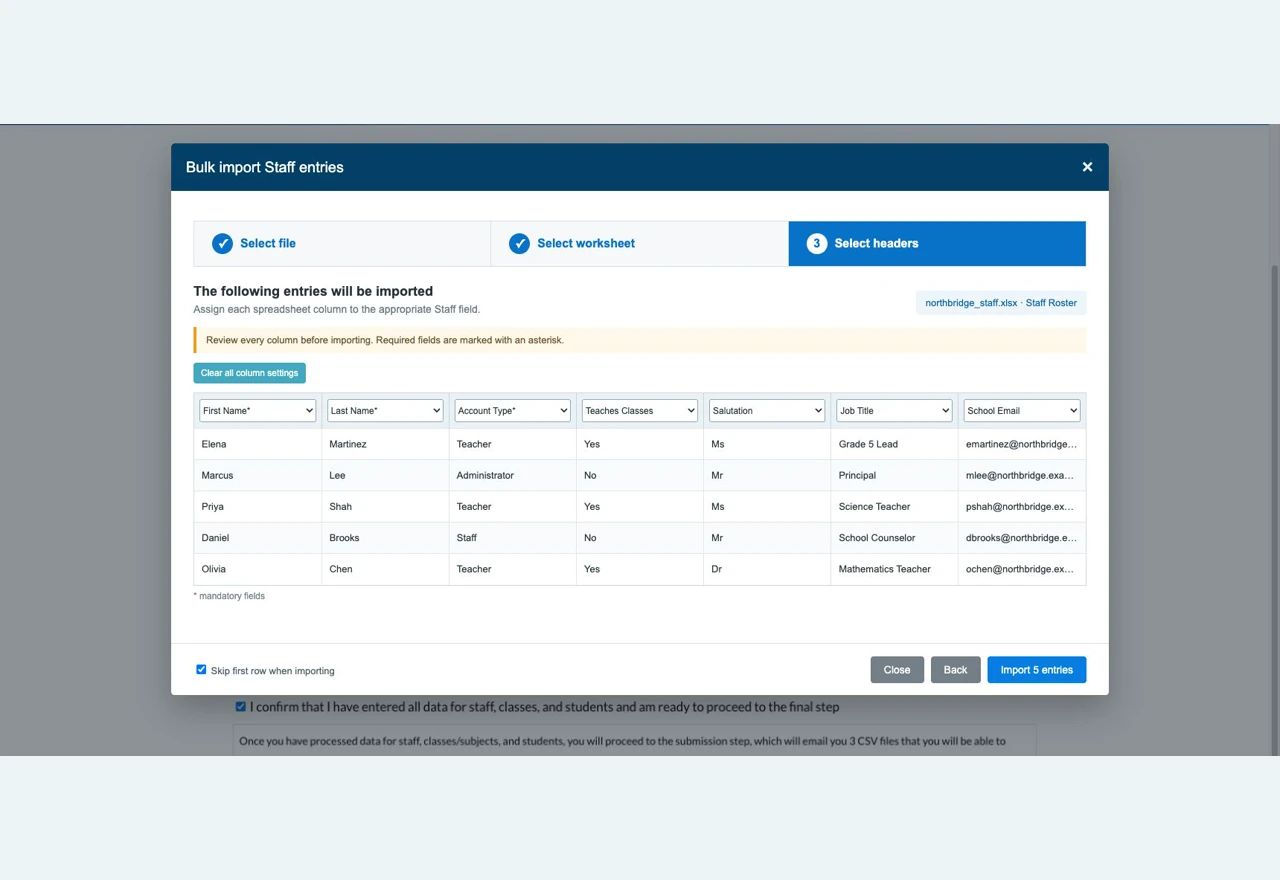
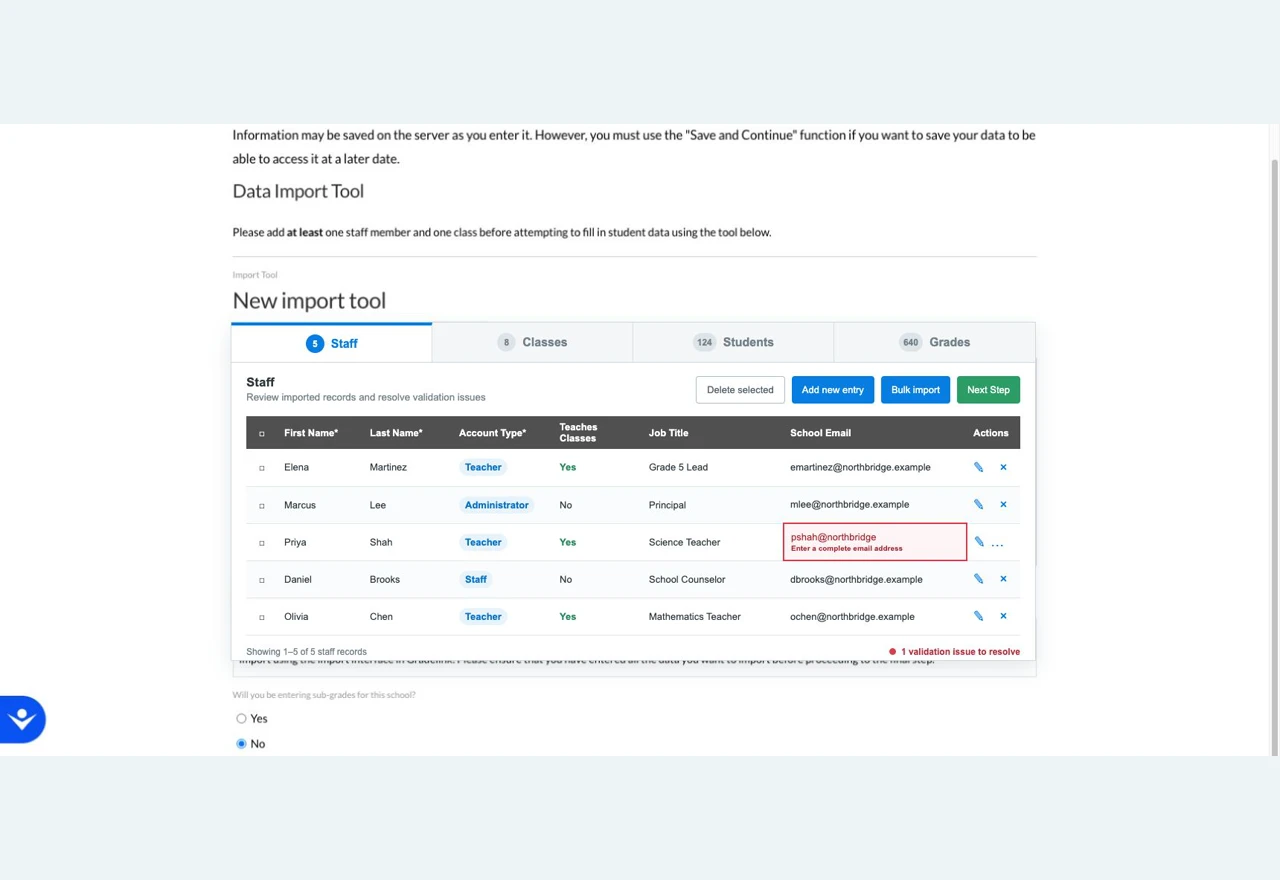
Interface screenshots contain fictional demonstration school, staff, contact and record data. No client, school, staff or student data is shown.
Uploading a CSV is easy. Trusting what is inside it is not.
Schools moving from another system rarely arrive with a clean template. Grade levels appear as “3”, “Grade 3” or “3rd Grade”; states may be names or abbreviations; phone formats vary; required columns are missing or named differently.
The records are also connected. A class needs a teacher already present in Staff, and one person can have an additional teaching role that must become a separate record in Gradelink’s target model. A flat file alone cannot preserve those rules.
The whole process happens before the school has an account. It has to survive page navigation, reloads and Save & Continue while still behaving like one coherent dataset inside a multi-page Gravity Forms flow.
Four layers make bulk import safe enough for onboarding.
Turns one form field into an application
A custom Gravity Forms field type renders the Vue interface inside the existing Gravity Forms journey. Staff, Classes, Students and Grades become tabs with their own tables, pagination, inline editing and bulk operations.
Maps unfamiliar spreadsheets deliberately
The wizard separates file upload, worksheet selection and column mapping. A live preview makes the mapping visible before import, while normalisers translate common grade, state and phone variations into accepted values.
Uses the form’s own validation rules
Every imported row runs through Gravity Forms validation. Required fields, formats and configured choices stay aligned with the form admin instead of being copied into a second validator, and errors return to the exact cell that needs attention.
Preserves relationships while the dataset changes
Dynamic fields resolve a Class teacher against Staff created in the same session. Related-record checks prevent destructive edits, and Gradelink’s dual-role rule can create the additional Teacher record the destination model requires.
Several Gravity Forms, presented as one linked dataset.
Each entity remains a separate nested Gravity Form, so field configuration and validation stay manageable in WordPress. The Vue application receives those form definitions from PHP and presents them as a single tabbed import workspace.
Rows are stored in dedicated MySQL tables generated for each linked form, keyed to the main form’s Save & Continue token. The dataset can be paginated, edited and resumed without packing hundreds of records into serialized entry metadata.
On final submission, the import session is attached to the Gravity Forms entry and one CSV is generated for each required entity. Hash-verified download and regenerate links make those artifacts available from the entry-detail screen without exposing the underlying upload directory.
The difficult parts sit between the layers.
One rule engine, not two
Reusing Gravity Forms validation means an admin can change field requirements or choices without silently leaving the importer’s rules behind.
Store rows as rows
Dedicated tables support filtering, pagination, bulk edits and relationships while keeping the eventual Gravity Forms entry compact and understandable.
Carry proven plumbing forward
An internal namespaced toolkit supplied secure documents and generic data-store patterns, leaving this build to focus on Gradelink’s import and linking rules.
Moving complex data through a WordPress workflow?
The upload is rarely the hard part. The real work is preserving validation, relationships, resumable state and usable feedback from source file to final output.