EngineCert’s existing site mixed WPBakery pages with newer native WordPress
structures, making the frontend slow to change and difficult to keep consistent.
The rebuild translates a complete wireframe into a block-native system, gives
repeated service content a single source of truth and carries legacy Industry News
into a structure designed for continued publishing.
The new direction does more than change the palette. Page structure, service
content, navigation and editorial components now share a consistent set of patterns
that can be reused instead of reconstructed page by page.
The existing site had grown across WPBakery and more recent native WordPress work.
The result was not one editable system but overlapping structures, inconsistent
presentation and a growing number of content and frontend errors.
A full wireframe defined the new information architecture: core company pages,
approximately twenty service and subservice pages, fourteen homepage service cards
and a dedicated Industry News section. The aesthetic had to align with a newer
sibling site without copying its implementation constraints.
The news archive added migration risk. Legacy articles under /news/ could
carry search value, so the rebuild needed a deliberate path into
/industry-news/, including redirects and a structure that supports future
editorial automation.
The wireframe was rebuilt with GeneratePress, GenerateBlocks and a focused custom
theme layer. Reusable typography, spacing, buttons, cards, headers and content
sections replace the former mix of builder output and one-off markup.
The fourteen primary service cards are modelled as structured content rather than
copied homepage blocks. Thumbnails, descriptions and related page data can be
updated centrally and reused across service grids and individual destinations.
Legacy material is mapped into a dedicated news structure with categories, archives,
author presentation, related-article components and planned 301 redirects from old
URLs. The migration protects useful content without preserving the old frontend.
n8n collects newsletter messages from a dedicated Gmail intake, parses each item,
sends the prepared context to Claude and routes the result either to the Industry
News post type or to an error-notification path. Publication remains a deliberate
decision for the EngineCert team.
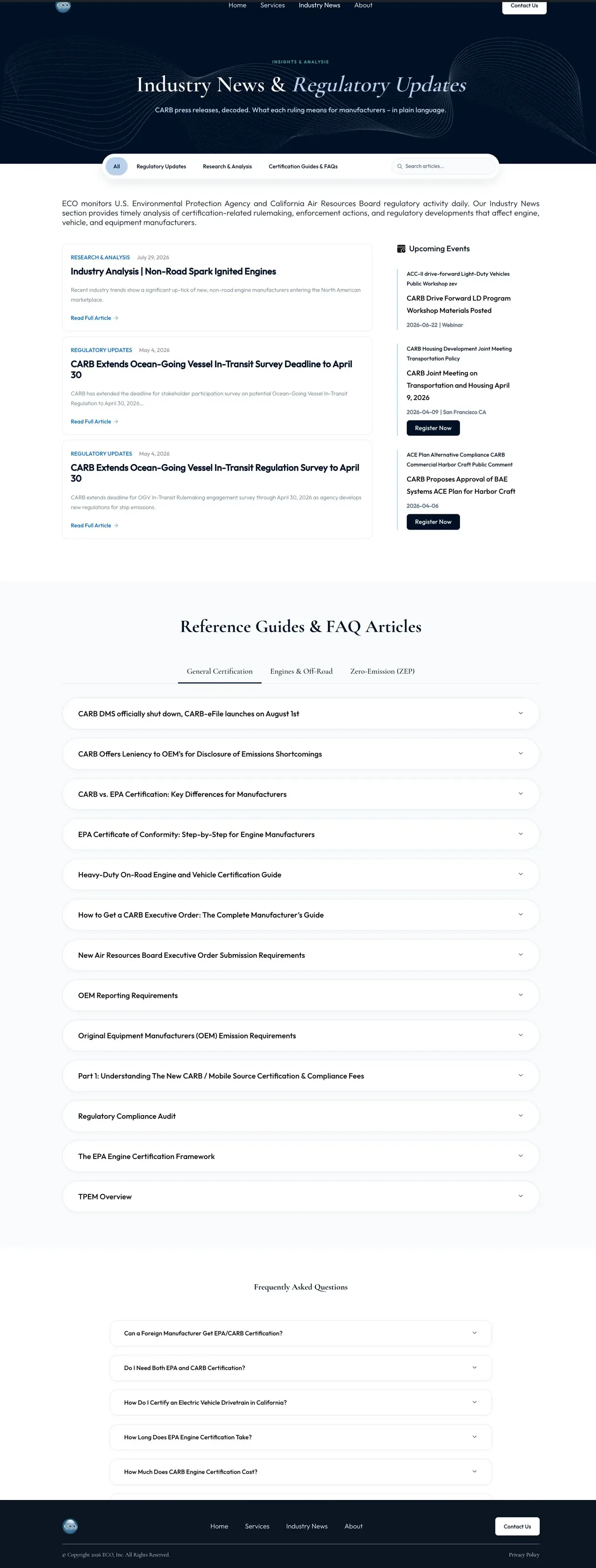
The legacy archive was not simply moved into a new template. It became a focused
destination for regulatory analysis, categories, search, industry events and
frequently asked questions — all assembled from reusable publishing components.
The page brings regulatory updates, research, events and reference material into
one structured publishing surface. Taxonomies, query loops and shared cards let new
material enter the system without rebuilding the page around every article.
Behind it, a published n8n workflow turns a newsletter inbox into a controlled
preparation queue. A Gmail trigger collects messages, a loop handles them one at a
time, and dedicated parsing steps extract the useful newsletter content before an
AI request is assembled.
Claude returns the contextualised material, which is parsed and checked before n8n
sends a structured item to the custom WordPress carb-news endpoint. Failed
AI parsing follows a separate Gmail notification branch, so an exception does not
disappear silently inside the automation.
The boundary is deliberate: n8n prepares; the EngineCert team decides. Generated
content remains unpublished until a reviewer checks the source, technical framing
and relevance, then chooses publish or discard. Final payload handling, permissions
and failure behaviour remain part of the pre-launch audit.
The site was developed locally, versioned in a private repository and moved through
a staging approval process. That kept the live site available while templates,
content models and migration rules were tested as a complete system.
GeneratePress supplies the lean theme foundation; GenerateBlocks composes the page
and query-loop structures; a custom child theme carries the visual system. A custom
functionality plugin owns service and Industry News behaviour that should not be
coupled to presentation.
ACF fields keep repeated metadata editable, including service descriptors and author
profiles. Shared card components support both services and related news, while the
pre-launch pass will check migrated content, redirects, brand consistency and
responsive behaviour before the production switch.
Service labels and descriptions can become outdated. Structured records let the
team update that information once instead of finding every copied card.
The content pipeline can collect and contextualise source material, but publication
still requires a deliberate human decision from the EngineCert team.
Legacy news and renamed services are handled as migration decisions with explicit
destinations and redirects, rather than cleanup performed after launch.
A rebuild is the opportunity to resolve the content model, editing workflow,
performance foundation and migration plan together — before another layer is added.
A cleaner, faster foundation for a technical certification business.
From a mixed frontend to one visual and content system.
Two frontend generations were sharing one website.
Four systems replaced page-by-page maintenance.
One block-native frontend
Service content managed once
Industry News became a real publishing section
Automation stops at editorial approval
Industry News became a product surface. n8n became the preparation layer.
A rebuild from the wireframe, not a reskin of the old pages.
The foundation was designed for the next edit, not just launch day.
Centralise what regulations can change
Automate preparation, not accountability
Move URLs with a map, not by accident
Is your website carrying two generations of frontend decisions?
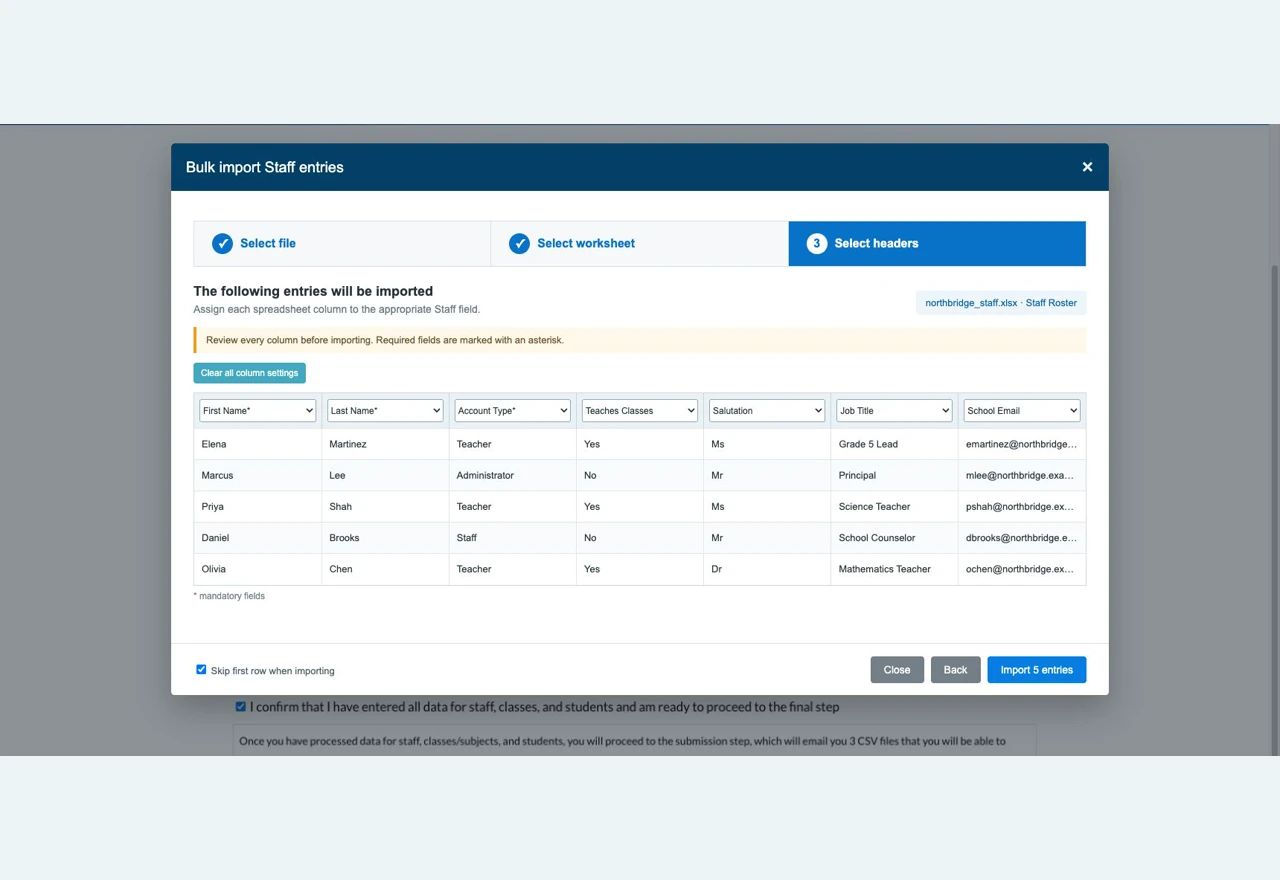
A spreadsheet-grade import experience inside Gravity Forms.
Schools onboarding to Gradelink already had their Staff, Classes, Students and
Grades in spreadsheets. The work turned a custom Gravity Forms field into a Vue 3
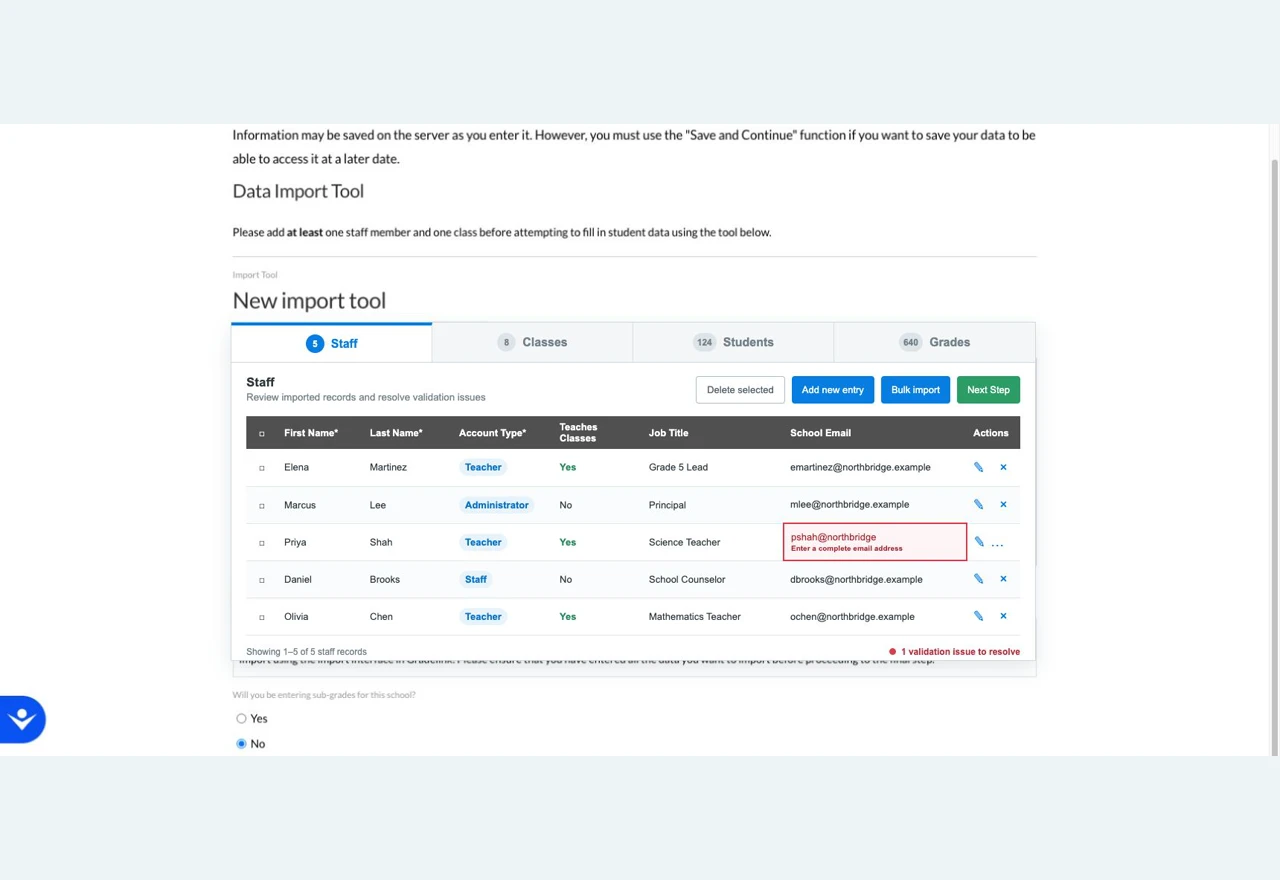
application where those linked records can be imported, corrected and validated
before the main onboarding form is submitted.
The interface keeps bulk operations fast without making data quality invisible.
Users can map an unfamiliar workbook, preview the result, then work directly with
the imported records and their validation state.
Interface screenshots contain fictional demonstration school, staff, contact and record data. No client, school, staff or student data is shown.
Schools moving from another system rarely arrive with a clean template. Grade levels
appear as “3”, “Grade 3” or “3rd Grade”; states may be names or abbreviations;
phone formats vary; required columns are missing or named differently.
The records are also connected. A class needs a teacher already present in Staff,
and one person can have an additional teaching role that must become a separate
record in Gradelink’s target model. A flat file alone cannot preserve those rules.
The whole process happens before the school has an account. It has to survive page
navigation, reloads and Save & Continue while still behaving like one coherent
dataset inside a multi-page Gravity Forms flow.
A custom Gravity Forms field type renders the Vue interface inside the existing
Gravity Forms journey. Staff, Classes, Students and Grades become tabs with their
own tables, pagination, inline editing and bulk operations.
The wizard separates file upload, worksheet selection and column mapping. A live
preview makes the mapping visible before import, while normalisers translate common
grade, state and phone variations into accepted values.
Every imported row runs through Gravity Forms validation. Required fields, formats
and configured choices stay aligned with the form admin instead of being copied into
a second validator, and errors return to the exact cell that needs attention.
Dynamic fields resolve a Class teacher against Staff created in the same session.
Related-record checks prevent destructive edits, and Gradelink’s dual-role rule can
create the additional Teacher record the destination model requires.
Each entity remains a separate nested Gravity Form, so field configuration and
validation stay manageable in WordPress. The Vue application receives those form
definitions from PHP and presents them as a single tabbed import workspace.
Rows are stored in dedicated MySQL tables generated for each linked form, keyed to
the main form’s Save & Continue token. The dataset can be paginated, edited and
resumed without packing hundreds of records into serialized entry metadata.
On final submission, the import session is attached to the Gravity Forms entry and
one CSV is generated for each required entity. Hash-verified download and regenerate
links make those artifacts available from the entry-detail screen without exposing
the underlying upload directory.
Reusing Gravity Forms validation means an admin can change field requirements or
choices without silently leaving the importer’s rules behind.
Dedicated tables support filtering, pagination, bulk edits and relationships while
keeping the eventual Gravity Forms entry compact and understandable.
An internal namespaced toolkit supplied secure documents and generic data-store
patterns, leaving this build to focus on Gradelink’s import and linking rules.
The upload is rarely the hard part. The real work is preserving validation,
relationships, resumable state and usable feedback from source file to final output.
A spreadsheet-grade import experience inside Gravity Forms.
A guided import, with the control of a spreadsheet.
Uploading a CSV is easy. Trusting what is inside it is not.
Four layers make bulk import safe enough for onboarding.
Turns one form field into an application
Maps unfamiliar spreadsheets deliberately
Uses the form’s own validation rules
Preserves relationships while the dataset changes
Several Gravity Forms, presented as one linked dataset.
The difficult parts sit between the layers.
One rule engine, not two
Store rows as rows
Carry proven plumbing forward
Moving complex data through a WordPress workflow?
A subscription-based compliance platform for the air-cargo industry.
World AVSEC turns the records behind TSA air-cargo compliance into a multi-role
application: companies, facilities, employees, training, documents, subscriptions
and partner authorisations in one system. WordPress and WooCommerce provide the
foundation; the product logic lives in a custom application layer built around the
way the supply chain actually works.
The account area has to do two jobs at once: keep each facility’s compliance
evidence current, then expose the right evidence when another business needs to
verify and authorise a working relationship.
Interface screenshots contain fictional demonstration names, organisations, contact details, addresses and compliance records. No customer or user data is shown.
Air-cargo companies need current records for drivers, security threat assessments,
mandatory training, facilities, vehicles, screening equipment and supporting
documents. When those records live in spreadsheets, folders and email threads,
answering a compliance question becomes a search exercise.
The data is relational. A user belongs to a company; a company can operate several
facilities; each facility has its own employees, evidence, assets and subscription
state. A flat membership plugin cannot represent that hierarchy safely or clearly.
The supply chain adds a second problem. An Indirect Air Carrier may need to work
with an authorised representative in another market. Finding that facility,
requesting a connection and exchanging authorisation evidence are part of the same
operational workflow as the underlying compliance records.
Role-aware registration creates the user, company and first facility together.
From there, each organisation manages its facilities, employees, fleet, airport
zones, screening equipment and secure documents in the right context.
WooCommerce Subscriptions is more than checkout. Company and facility access are
gated by subscription status, and status-change hooks activate or deactivate the
corresponding facilities without duplicating a second billing system.
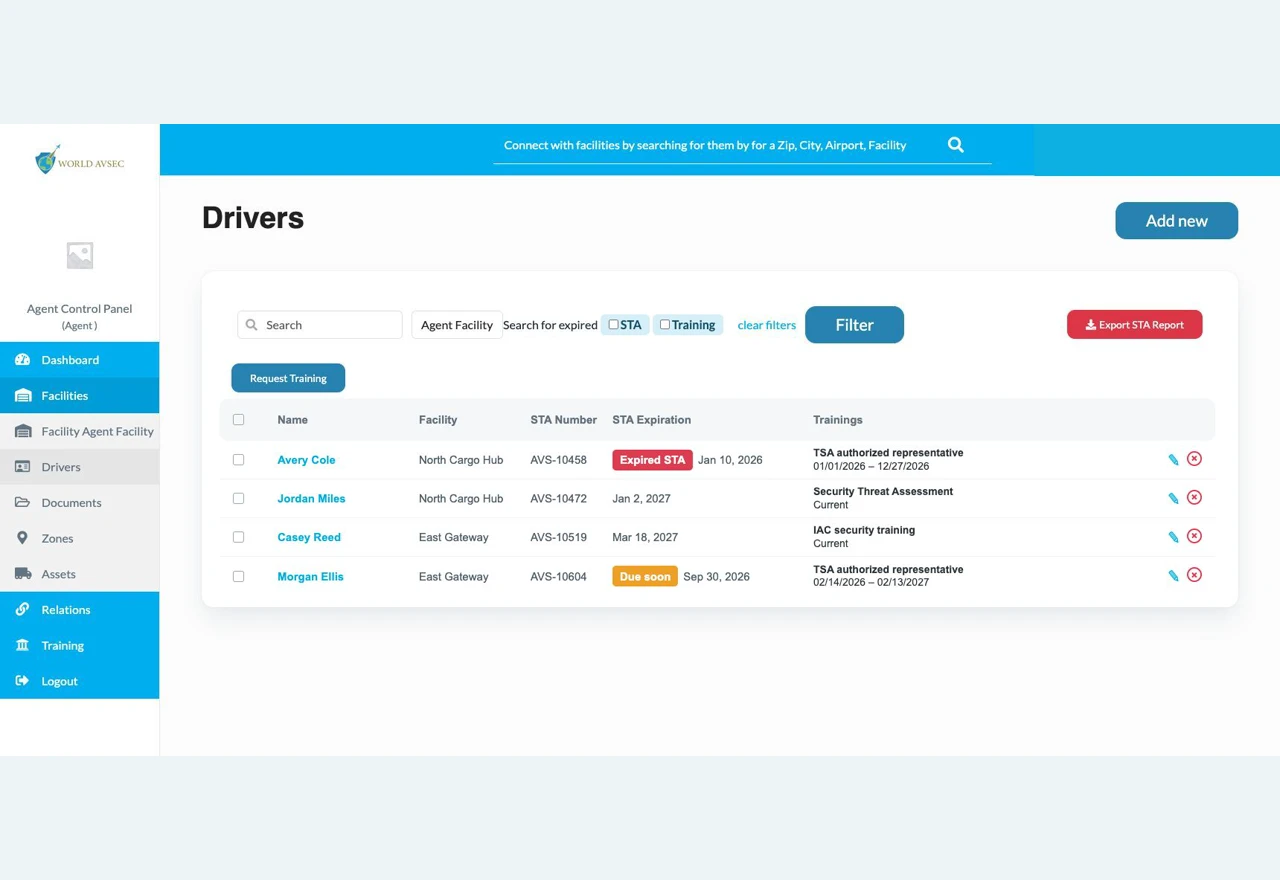
Driver records hold STA numbers, status and expiry dates alongside required training
and certificates. Teams can filter expired records, request training in bulk and
export the current state when it needs to leave the platform.
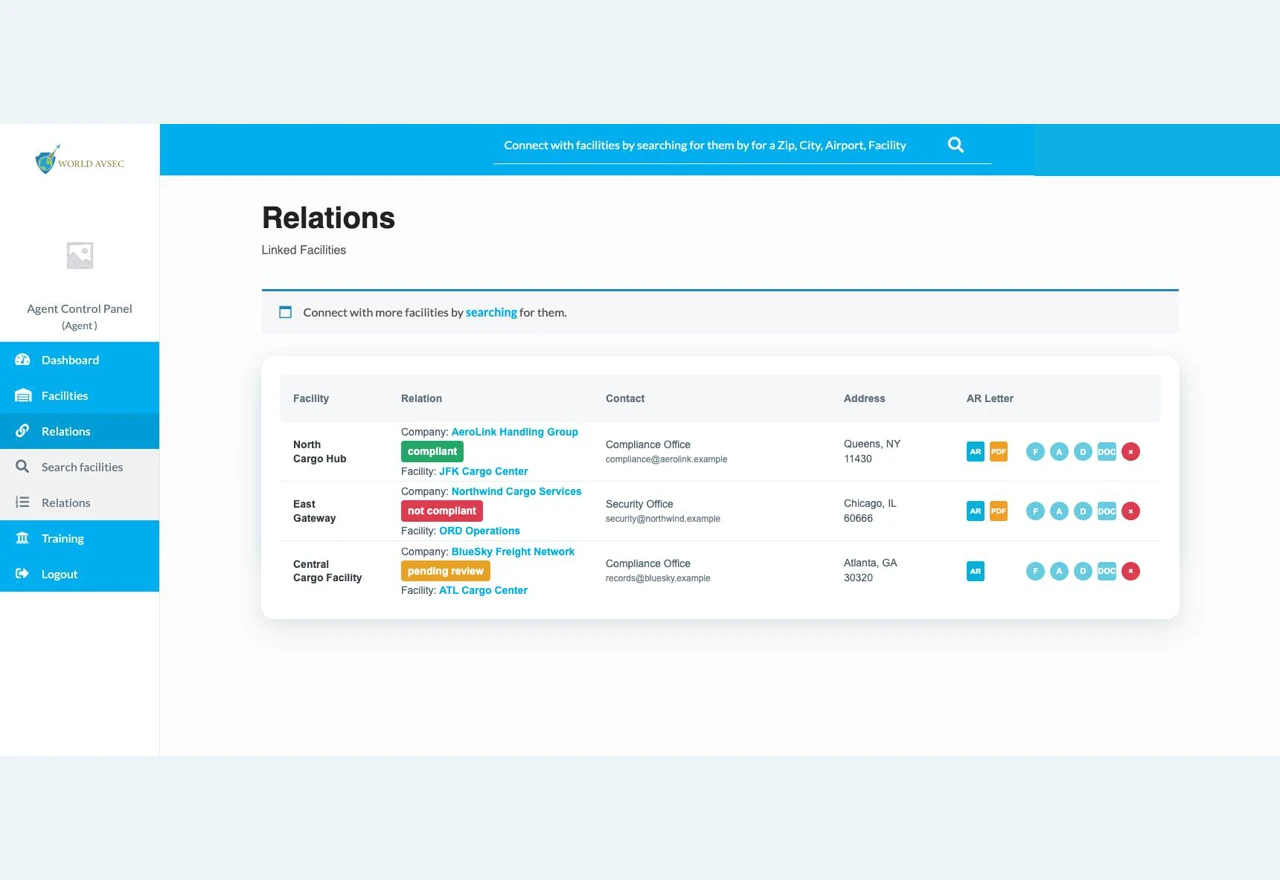
Facilities can be found by location and capability, connection requests can be
accepted or rejected, and authorisation letters can be generated as PDFs. Partner
access builds on those relationships instead of exposing operational data publicly.
The custom domain plugin separates models, controllers, data stores, enumerations
and email classes behind a namespaced autoloader. Business rules have a defined
home instead of accumulating in a theme file or a chain of page-builder callbacks.
WooCommerce handles products, orders and recurring payments; the application layer
maps those events onto companies and facilities. A custom theme and a partial Vue.js
frontend provide the account experience without forcing every screen into a single
frontend framework.
Google Places supports structured facility addresses. Secure document handlers keep
upload and download permissions inside the platform, while a custom HTML-to-PDF
layer turns signed authorisation records into portable evidence.
Companies, facilities and users are separate entities because ownership, billing,
permissions and compliance evidence do not all live at the same level.
Payment state has a direct operational consequence. Mapping WooCommerce status
changes onto facilities keeps billing and product access in one source of truth.
The domain plugin keeps models, persistence, workflows and email behaviour explicit,
so the platform can evolve without turning the theme into the application.
WordPress can support complex operational products when the data model, permissions,
billing events and workflows are designed as one system. That architecture is the
work — the interface is only where it becomes visible.
A subscription-based compliance platform for the air-cargo industry.
Records inside one company. Trust between many companies.
The compliance data was scattered. The obligation was not.
Four layers turn records into an operating system.
Models the business hierarchy
Makes billing part of application state
Keeps evidence attached to the people and places it describes
Connects companies through an explicit workflow
A WordPress codebase organised like a product.
Where the architecture carries the business rules.
Model the supply chain, not a membership list
Use subscription events as domain events
Give every rule a durable home
Building a portal that standard plugins cannot describe?
A calmer, clearer and faster digital experience for a family law firm.
A solo family-law practice had a website that read like a firm brochure — at the exact
moment its visitors needed a guide. The work reframed the client journey and moved the
frontend off Elementor onto GeneratePress and GenerateBlocks, migrating in place so
every URL, page and piece of SEO equity survived the change.
Nothing was rewritten. The copy, the practice areas and the URLs are the ones the firm
already had — what changed is the order they arrive in and how much work the visitor
has to do to find what applies to them.
Client identity, contact details and imagery have been anonymized. The layouts shown are faithful recreations of the original pages.
“It feels more like a traditional law firm brochure than a client acquisition
tool. I don’t think the site immediately connects with those concerns or
clearly guides them toward contacting us.”
People land on a family-law site in the middle of a divorce, a custody dispute or
a support modification. They arrive overwhelmed, and they are holding one
question: can this firm help me, and what do I do next?
The old site answered neither quickly. Practice areas sat behind a dropdown, the
attorney herself appeared well below the fold, reviews were not visible at all,
and every heading on the page was set in capitals — which flattens hierarchy and
makes a page harder to scan precisely when a visitor has the least patience for
scanning it.
Underneath the design problem was a structural one. The frontend was built in
Elementor, which meant every page carried the builder’s markup and asset
weight, and any future change meant editing inside the builder rather than
reusing a component.
The first thing a visitor sees is whether their situation is one this firm
handles. Practice areas came out of the navigation dropdown and onto the page as
a labelled index, so recognition happens in seconds rather than after a hunt.
The attorney appears prominently and early — she was comfortable with that, and
for a solo practice she is the offer. Alongside her: client reviews
shown with their star ratings, and the credentials that actually differentiate
her — guardian ad litem and mediator certifications, continuing-education
speaking, and press coverage of a landmark case.
The contact form is the primary action, with the phone number present throughout
rather than parked on a contact page. The intake process is laid out as its own
section — call, schedule, meet, review and sign, begin — because someone deciding
whether to make that call wants to know what happens after it. The firm does not
offer free consultations, so no call to action pretends otherwise.
Headings came out of all-capitals and into a real type scale, on consistently
light backgrounds with no heavy dark breaks. The brief the owner gave was
“clean, light, airy” — for an audience arriving under stress, the
calm is functional, not decorative.
The site had years of accumulated search equity on URLs that were working. A
from-scratch rebuild would have meant a new permalink structure, a redirect map
to maintain, and a period of ranking volatility for a practice whose enquiries
come largely from local search.
So the live site was cloned, and Elementor was swapped out for GeneratePress and
GenerateBlocks in place, slug for slug. Blog posts were clean prose and moved
across directly; the builder-made service pages were rebuilt as blocks. Almost
nothing needed redirecting.
A new estate-planning practice area was added as a proper silo — one landing page
with four service pages nested under it — using copy the owner had already
written, used as supplied.
The contact form was written directly rather than pulled in from a form plugin:
fewer moving parts, no plugin licence to renew, and no third-party script on the
page carrying the firm’s most sensitive traffic. Scheduling runs through an
embedded booking tool, and tag management was consolidated into the
client’s own container so she owns her tracking outright.
A clean rebuild is faster to quote and easier to execute. Cloning and swapping in
place is more fiddly, but it keeps the URLs, the media library and the rankings —
which is what the client is actually paying to protect.
The signed proposal had the new homepage launching first, with the old builder
still running the rest of the site. I argued against my own accepted terms: a
visible stretch of two different designs and two performance profiles costs more
credibility than a later launch does.
The approved design carried a street address the firm had moved away from. Caught
and corrected before build, not after a client walked to the wrong building —
the kind of error a page builder will happily ship at any scale.
Most of these rebuilds start the same way: the site still works, but every change is
slow, the pages are heavier than they should be, and nobody wants to touch the URLs.
That migration is a solved problem — it just has to be done deliberately.
A calmer, clearer and faster digital experience for a family law firm.
Same content. A different reading experience.
A brochure, at the moment someone needs a guide.
Four decisions did most of the work.
Practice areas move to the front
Trust signals became visible, not implied
One next step, explained before it is asked for
Typography carries hierarchy again
A migration in place, not a new site.
The decisions that were not on the brief.
Migrate, don’t rebuild
One go-live, not two
Catch the wrong address
Sitting on a page builder you have outgrown?